[Kubernetes] Deployment 생성
kubectl create deployment로 Flask 예제 이미지를 Deployment로 배포하고 kubectl get all, kubectl describe로 Pod와 ReplicaSet 상태를 확인하는 방법을 정리합니다.
요약
kubectl create deployment --image=han0495/flask-example-app:v1 flask-example-app으로 애플리케이션을 Deployment로 배포합니다.kubectl get all로 Deployment와 함께 생성된 Pod, ReplicaSet이 정상 실행 중인지 확인합니다.kubectl describe deployment로 Replicas 수, 이미지, RollingUpdate 전략 같은 상세 정보를 볼 수 있습니다.
목차
- Build APP - Container image
- Deploy APP
- Check APP
- Expose APP
- Scale APP
- Update APP
Create the Deployment
이 문서는 Kubernetes 의 Deployment 를 생성하는 방법에 대해 포함되어 있습니다.
Deployment 란?
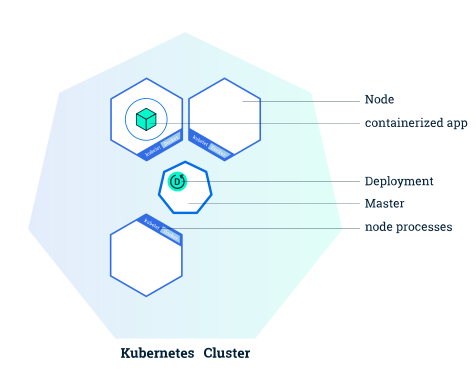
Deployment는 Kubernetes 가 애플리케이션의 인스턴스를 어떻게 생성하고 업데이트해야 하는지를 지시합니다.
Deployment가 만들어지면, Kubernetes Master 가 해당 Deployment 에 포함된 애플리케이션 인스턴스가 클러스터의 개별 노드에서 실행되도록 스케줄합니다.
Create Deployment
아래 명령어와 같이 수행합니다.
$ kubectl create deployment --image=han0495/flask-example-app:v1 flask-example-app
Check Deployment
Deployment 가 생성되고 Pod 가 정상적으로 실행중인지 확인합니다.
$ kubectl get all
NAME                                    READY   STATUS    RESTARTS   AGE
pod/flask-example-app-959c5f88d-k95wk   1/1     Running   0          4s

NAME                 TYPE        CLUSTER-IP   EXTERNAL-IP   PORT(S)   AGE
service/kubernetes   ClusterIP   10.43.0.1    <none>        443/TCP   5m37s

NAME                                READY   UP-TO-DATE   AVAILABLE   AGE
deployment.apps/flask-example-app   1/1     1            1           5s

NAME                                          DESIRED   CURRENT   READY   AGE
replicaset.apps/flask-example-app-959c5f88d   1         1         1       5s
Detail Check Deployment
실행중인 Deployment 를 자세히 확인 해보겠습니다.
$ kubectl describe deployment flask-example-app
Name:                   flask-example-app
Namespace:              default
CreationTimestamp:      Wed, 09 Sep 2020 15:37:59 +0900
Labels:                 app=flask-example-app
Annotations:            deployment.kubernetes.io/revision: 1
Selector:               app=flask-example-app
Replicas:               1 desired | 1 updated | 1 total | 1 available | 0 unavailable
StrategyType:           RollingUpdate
MinReadySeconds:        0
RollingUpdateStrategy:  25% max unavailable, 25% max surge
Pod Template:
  Labels:  app=flask-example-app
  Containers:
   flask-example-app:
    Image:        han0495/flask-example-app:v1
    Port:         <none>
    Host Port:    <none>
    Environment:  <none>
    Mounts:       <none>
  Volumes:        <none>
Conditions:
  Type           Status  Reason
  ----           ------  ------
  Available      True    MinimumReplicasAvailable
  Progressing    True    NewReplicaSetAvailable
OldReplicaSets:  <none>
NewReplicaSet:   flask-example-app-959c5f88d (1/1 replicas created)
Events:
  Type    Reason             Age    From                   Message
  ----    ------             ----   ----                   -------
  Normal  ScalingReplicaSet  7m21s  deployment-controller  Scaled up replica set flask-example-app-959c5f88d to 1
참고 문서
- https://kubernetes.io/ko/docs/tutorials/kubernetes-basics/deploy-app/deploy-intro/
- https://github.com/chhanz/kubernetes-hands-on-lab
- https://github.com/chhanz/kubernetes-hands-on-lab/blob/master/doc/create-the-deployment.md
자주 묻는 질문
Kubernetes Deployment는 어떤 역할을 하나요?
Deployment는 Kubernetes가 애플리케이션 인스턴스를 어떻게 생성하고 업데이트할지 지시합니다. Deployment가 만들어지면 Kubernetes Master가 인스턴스를 클러스터의 개별 노드에 스케줄합니다.
kubectl로 Deployment를 만들면 어떤 리소스가 함께 생성되나요?
Deployment와 함께 ReplicaSet과 Pod가 생성됩니다. kubectl get all로 한 번에 확인할 수 있습니다.
Deployment의 업데이트 전략은 어디서 확인하나요?
kubectl describe deployment flask-example-app 결과의 StrategyType과 RollingUpdateStrategy 항목에서 확인합니다. 본문 예제는 RollingUpdate, 25% max unavailable, 25% max surge로 표시됩니다.